
 Instagram
  Youtube
  Whatsapp
 What Is Cloud-Native Development and How Is It Different From Traditional Development?
If you've been anywhere near a tech conversation lately, you've probably heard someone say "we're going cloud-native" like it's obvious what that means. It's one of those terms that gets thrown around a lot, but a lot of people even in tech struggle to explain exactly what makes it different from just building software and putting it on the cloud. So let's actually break it down and along the way, look at why this matters if you're evaluating a web design company, a website design company, or web development services for your next project.
What Does "Cloud-Native" Actually Mean?
Cloud-native development means building applications specifically designed to run in cloud environments from the ground up, not just moving an existing app onto cloud servers and calling it done.
Here's the distinction that trips people up: hosting your app on the cloud isn't the same as being cloud-native. You can take an old-school application and just run it on a cloud server that's cloud hosting, not cloud-native. True cloud-native apps are architected specifically to take advantage of what the cloud actually offers: flexibility, scalability, and resilience, baked in from day one. This is also why choosing the right web design company in india businesses rely on can make a real difference the underlying architecture decisions happen long before the visual design does.
How Is This Different From Traditional Development?
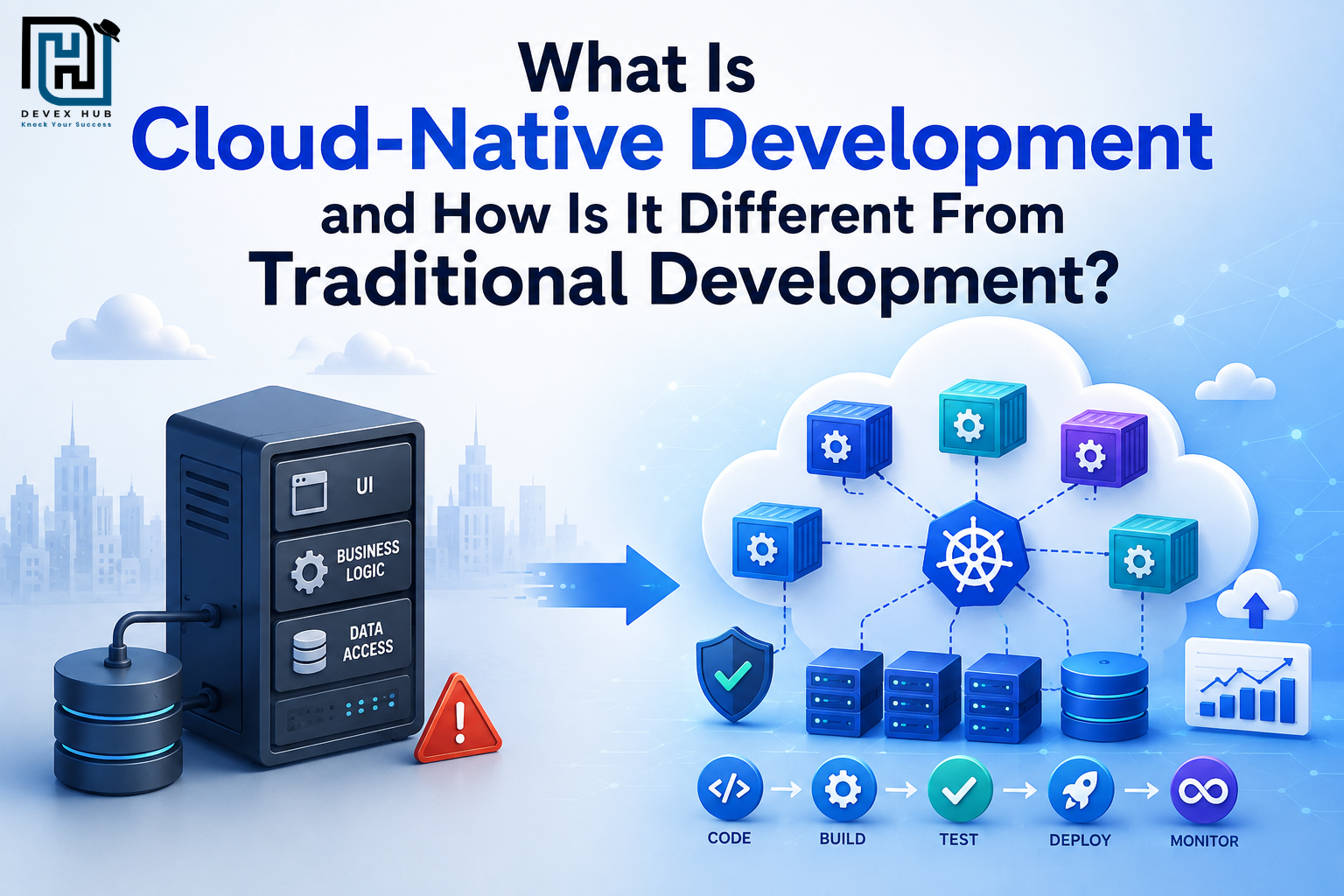
Traditional development usually means building one large, tightly connected application that's often called a "monolith." Everything the user interface, the business logic, the database connections live together in one codebase. It's deployed as a single unit, and if one part needs an update, often the whole thing needs to be redeployed.
Cloud-native development takes a very different approach. Instead of one big application, it's built as a collection of smaller, independent pieces usually called microservices that each handle a specific job and can be updated, scaled, or restarted independently, without touching the rest of the system.
Think of it like the difference between one massive machine with everything welded together, versus a set of modular components that can each be swapped out or upgraded without shutting the whole thing down. This is the kind of thinking a modern website development company brings to a project from day one, rather than retrofitting it later.
The Core Building Blocks of Cloud-Native Development
- Microservices: Breaking an application into small, independent services instead of one large connected system.
- Containers: Packaging each service with everything it needs to run consistently, regardless of where it's deployed. This is what tools like Docker are built around.
- Orchestration: Managing all those containers automatically starting, stopping, scaling, and healing them as needed. Kubernetes is the most common tool for this.
- Continuous delivery: Shipping updates frequently and automatically, instead of large, infrequent releases that require a lot of manual coordination.
- Built-in scalability: Cloud-native apps are designed to automatically scale up or down based on real-time demand, rather than being built for a fixed capacity.
These building blocks aren't just backend concerns either. Good web designing and website designing practices increasingly need to account for how a site or application behaves under a cloud-native setup, including component-based front-end design and performance under variable load. You can visit our Google Business Profile for additional information, updates, and customer insights.
Why Does This Actually Matter for Businesses?
Faster updates, less risk: Since services are independent, teams can update one part of an application without redeploying the entire thing which means fewer "everything is down" moments and faster fixes.
Better handling of unpredictable demand: A cloud-native app can automatically scale up during a traffic spike and scale back down afterward, instead of running on a fixed amount of server capacity that either wastes money or runs out at the worst possible time.
More resilience: If one microservice fails, it doesn't necessarily bring the whole application down, the rest of the system can often keep running while that one piece recovers.
Easier to grow over time: Adding new features or scaling to more users doesn't require rebuilding the whole application from scratch; you can often just add or adjust individual services.
This is exactly the kind of long-term thinking businesses should expect from any serious web solutions provider, not just a team that can make a page look good, but one that understands web design as part of a bigger technical picture.
Where AI Fits Into Cloud-Native Development
AI web development is increasingly part of this conversation. AI-assisted tools can now help automate testing, monitor microservices for anomalies, and even predict when a system needs to scale all of which pair naturally with cloud-native's built-in flexibility. Some businesses are also building an AI website that adjusts content, layout, or recommendations dynamically based on real-time user behavior, which works especially well on cloud-native infrastructure that can handle that kind of responsiveness without manual intervention.
Is Cloud-Native Always the Right Choice?
Not necessarily. It's genuinely more complex to build and manage than a traditional application, especially early on. Smaller applications with simple, predictable needs don't always benefit from the added complexity of microservices and orchestration, sometimes a simpler, traditional setup is honestly the more practical choice.
Cloud-native tends to make the most sense when an application needs to scale significantly, handle unpredictable traffic, or evolve quickly with frequent updates. If none of that applies yet, it might be more efficient to start simple, perhaps with standard web designing and move toward cloud-native architecture later, as actual needs grow.
Frequently Asked Questions
1. Is cloud-native the same as cloud-hosted?
No. Cloud-hosted means an app runs in the cloud, while cloud-native is built specifically to use cloud technologies like containers and microservices for better scalability and performance.
2. Do small businesses need cloud-native applications?
Not always. Many small businesses start with a standard website and adopt cloud-native architecture later as their business and traffic grow.
3. What's the difference between a monolith and microservices?
A monolith is a single application, while microservices split it into smaller, independent services that are easier to update and scale.
4. Is switching to cloud-native development expensive?
It requires an initial investment, but it can reduce long-term costs through better scalability, reliability, and easier maintenance.
5. Can AI help with cloud-native development?
Yes. AI can automate testing, monitoring, and performance optimization, making cloud-native applications more efficient and reliable.
6. How do I choose the right partner for cloud-native web development?
Choose a team with expertise in web development, cloud architecture, and scalable solutions that can support your business as it grows.
Conclusion
Cloud-native development isn't just about where your application lives, it's about how it's built. Traditional development focuses on creating a single, connected application, while cloud-native development is designed for scalability, flexibility, and resilience as business needs evolve. For businesses planning future growth or expecting changing user demands, understanding this difference can help you make smarter technology decisions.
If you're looking for expert guidance on building scalable web applications or choosing the right architecture for your business, contact us today. Our team can help you develop future-ready solutions tailored to your goals.


Comments
Post a Comment